Skip Navigation
Heroku Dev Center Dev Center
  • Get Started
  • Documentation
  • Changelog
  • Search
Heroku Dev Center Dev Center
  • Get Started
    • Node.js
    • Ruby on Rails
    • Ruby
    • Python
    • Java
    • PHP
    • Go
    • Scala
    • Clojure
    • .NET
  • Documentation
  • Changelog
  • More
    Additional Resources
    • Home
    • Elements
    • Products
    • Pricing
    • Careers
    • Help
    • Status
    • Events
    • Podcasts
    • Compliance Center
    Heroku Blog

    Heroku Blog

    Find out what's new with Heroku on our blog.

    Visit Blog
  • Log in or Sign up
Show nav
View categories

Categories

  • Heroku Architecture
    • Compute (Dynos)
      • Dyno Management
      • Dyno Concepts
      • Dyno Behavior
      • Dyno Reference
      • Dyno Troubleshooting
    • Stacks (operating system images)
    • Networking & DNS
    • Platform Policies
    • Platform Principles
    • Buildpacks
  • Developer Tools
    • AI Tools
    • Command Line
    • Heroku VS Code Extension
  • Deployment
    • Deploying with Git
    • Deploying with Docker
    • Deployment Integrations
  • Continuous Delivery & Integration (Heroku Flow)
    • Continuous Integration
  • Language Support
    • .NET
      • Working with .NET
    • Clojure
    • Front-end
    • Go
      • Go Dependency Management
    • Java
      • Java Behavior in Heroku
      • Working with Java
      • Working with Maven
      • Working with Spring Boot
      • Troubleshooting Java Apps
    • Node.js
      • Node.js Behavior in Heroku
      • Troubleshooting Node.js Apps
      • Working with Node.js
    • PHP
      • Working with PHP
      • PHP Behavior in Heroku
    • Python
      • Working with Python
      • Background Jobs in Python
      • Python Behavior in Heroku
      • Working with Django
    • Ruby
      • Rails Support
        • Working with Rails
      • Working with Bundler
      • Working with Ruby
      • Ruby Behavior in Heroku
      • Troubleshooting Ruby Apps
    • Scala
  • Databases & Data Management
    • Heroku Postgres
      • Postgres Basics
      • Postgres Getting Started
      • Postgres Performance
      • Postgres Data Transfer & Preservation
      • Postgres Availability
      • Postgres Special Topics
      • Migrating to Heroku Postgres
      • Heroku Postgres Advanced (Limited GA)
    • Heroku Key-Value Store
    • Apache Kafka on Heroku
    • Other Data Stores
  • AI
    • Inference Essentials
    • Inference API
    • Inference Quick Start Guides
    • AI Models
    • Tool Use
    • AI Integrations
    • Vector Database
  • Monitoring & Metrics
    • Logging
  • App Performance
  • Add-ons
    • All Add-ons
  • Collaboration
  • Security
    • App Security
    • Identities & Authentication
      • Single Sign-on (SSO)
    • Private Spaces
      • Infrastructure Networking
    • Compliance
  • Heroku Enterprise
    • Enterprise Accounts
    • Enterprise Teams
  • Patterns & Best Practices
  • Extending Heroku
    • Platform API
    • App Webhooks
    • Heroku Labs
    • Building Add-ons
      • Add-on Development Tasks
      • Add-on APIs
      • Add-on Guidelines & Requirements
    • Building CLI Plugins
    • Developing Buildpacks
    • Dev Center
  • Accounts & Billing
  • Troubleshooting & Support
  • Integrating with Salesforce
    • Heroku AppLink
      • Heroku AppLink Reference
      • Getting Started with Heroku AppLink
      • Working with Heroku AppLink
    • Heroku Connect (Salesforce sync)
      • Heroku Connect Administration
      • Heroku Connect Reference
      • Heroku Connect Troubleshooting
    • Other Salesforce Integrations
  • Language Support
  • Front-end
  • How the Front-End Web Cloud Native Buildpack Works

How the Front-End Web Cloud Native Buildpack Works

Table of Contents [expand]

  • How It Works
  • Caching

Last updated September 03, 2026

The Heroku Front-End Web Cloud Native Buildpack (CNB) is designed with open, standard primitives to help front-end web developers deliver production-quality apps built with any front-end framework.

This guide covers how the CNB works on Heroku. For instructions on how to use the buildpack, see Deploying Front-End Web Apps on Heroku.

How It Works

On Heroku, the project.toml file and config vars set the CNB configuration. Heroku front-end web apps support two distinct phases of configuration, during the build process and then at runtime when the web server launches.

  • Using the CNB build plan, other buildpacks can compose configuration for the static web server to support “zero-config” deployment of specific front-end frameworks.
  • CNBs produce standard OCI images, enabling local development with pack/Docker, and deployment to Heroku’s CNB stack.
  • The optional JavaScript/Node.js build environment is powered by the heroku/nodejs CNB with support for npm, pnpm, and yarn package managers.
  • At launch, runtime config vars are injected as standard HTML Data attributes, enabling browser apps to easily pick up configuration changes with only a server restart, so no rebuild is required
  • The web server runs in Heroku dynos to deliver sites to end users, providing streamlined, purpose-built capabilities for static web apps. The server is implemented with Caddy.
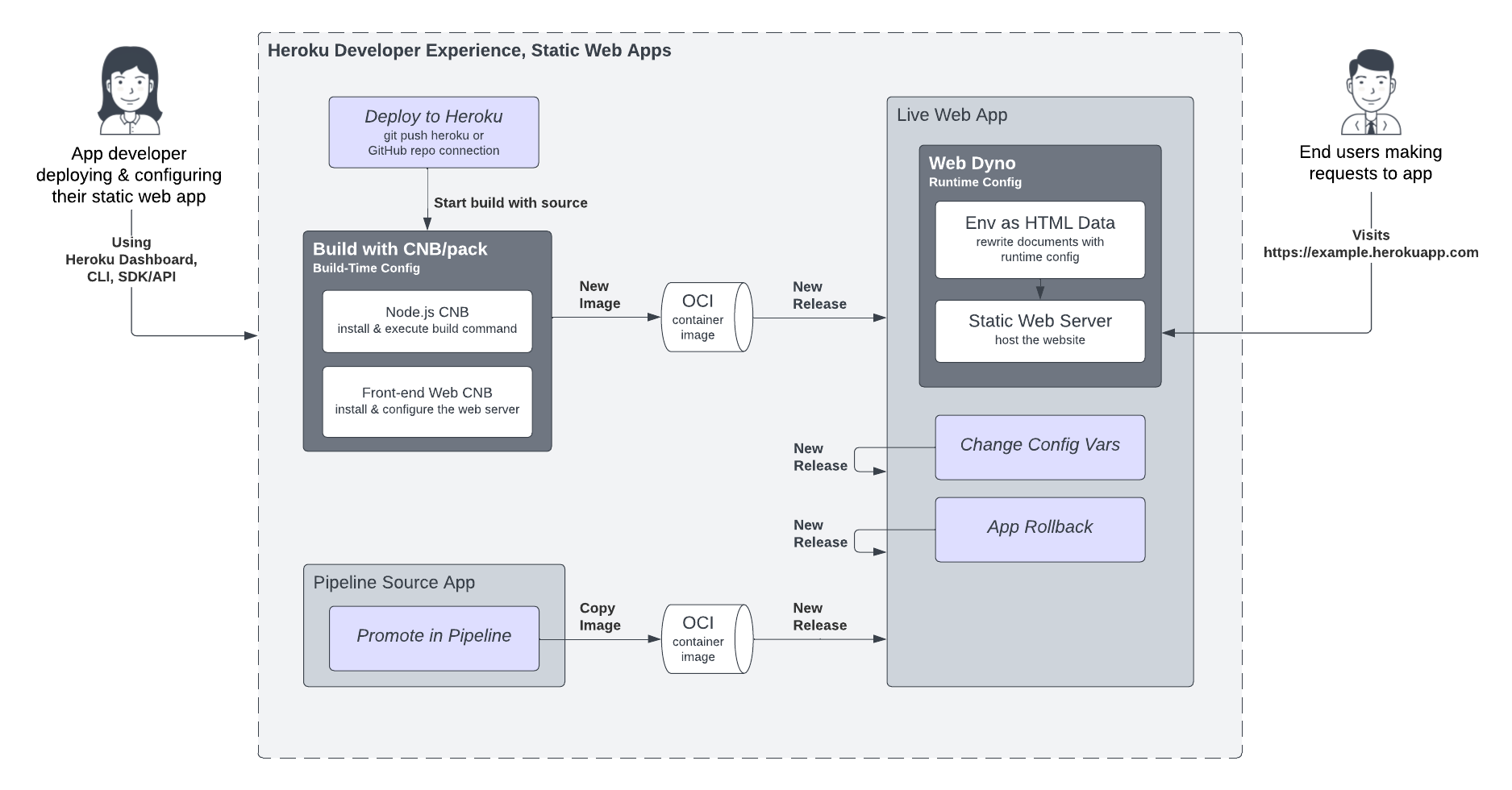
Architecture Diagram

Caching

Websites deployed with the Front-End Web buildpack are hosted directly in Heroku dynos. The static web server running on Heroku handles all requests from the internet. While this works great for development and small-scale production deployment, you can enhance website performance and resiliency to traffic spikes with well-crafted cache-control headers and a content delivery network (CDN), such as Cloudflare or Fastly.

Feedback

Log in to submit feedback.

Information & Support

  • Getting Started
  • Documentation
  • Changelog
  • Compliance Center
  • Training & Education
  • Blog
  • Support Channels
  • Status

Language Reference

  • Node.js
  • Ruby
  • Java
  • PHP
  • Python
  • Go
  • Scala
  • Clojure
  • .NET

Other Resources

  • Careers
  • Elements
  • Products
  • Pricing
  • RSS
    • Dev Center Articles
    • Dev Center Changelog
    • Heroku Blog
    • Heroku News Blog
    • Heroku Engineering Blog
  • Twitter
    • Dev Center Articles
    • Dev Center Changelog
    • Heroku
    • Heroku Status
  • Github
  • LinkedIn
  • © 2026 Salesforce, Inc. All rights reserved. Various trademarks held by their respective owners. Salesforce Tower, 415 Mission Street, 3rd Floor, San Francisco, CA 94105, United States
  • heroku.com
  • Legal
  • Terms of Service
  • Privacy Information
  • Responsible Disclosure
  • Trust
  • Contact
  • Cookie Preferences
  • Your Privacy Choices