Last updated October 01, 2025
A single app always runs in multiple environments, including at least on your development machine and in production on Heroku. An open-source app might be deployed to hundreds of different environments.
Although these environments might all run the same code, they usually have environment-specific configurations. For example, an app’s staging and production environments might use different Amazon S3 buckets, meaning they also need different credentials for those buckets.
An app’s environment-specific configuration should be stored in environment variables (not in the app’s source code). This lets you modify each environment’s configuration in isolation, and prevents secure credentials from being stored in version control. Learn more about storing config in the environment.
On a traditional host or when working locally, you often set environment variables in your .bashrc file. On Heroku, you use config vars.
Managing config vars
Whenever you set or remove a config var using any method, your app is restarted and a new release is created.
Config var values are persistent–they remain in place across deploys and app restarts. Unless you need to change a value, you only need to set it once.
Using the Heroku CLI
The heroku config commands of the Heroku CLI makes it easy to manage your app’s config vars.
View current config var values
$ heroku config
GITHUB_USERNAME: joesmith
OTHER_VAR:    production

$ heroku config:get GITHUB_USERNAME
joesmith
Set a config var
$ heroku config:set GITHUB_USERNAME=joesmith
Adding config vars and restarting myapp... done, v12
GITHUB_USERNAME: joesmith
Remove a config var
$ heroku config:unset GITHUB_USERNAME
Unsetting GITHUB_USERNAME and restarting myapp... done, v13
Using the Heroku Dashboard
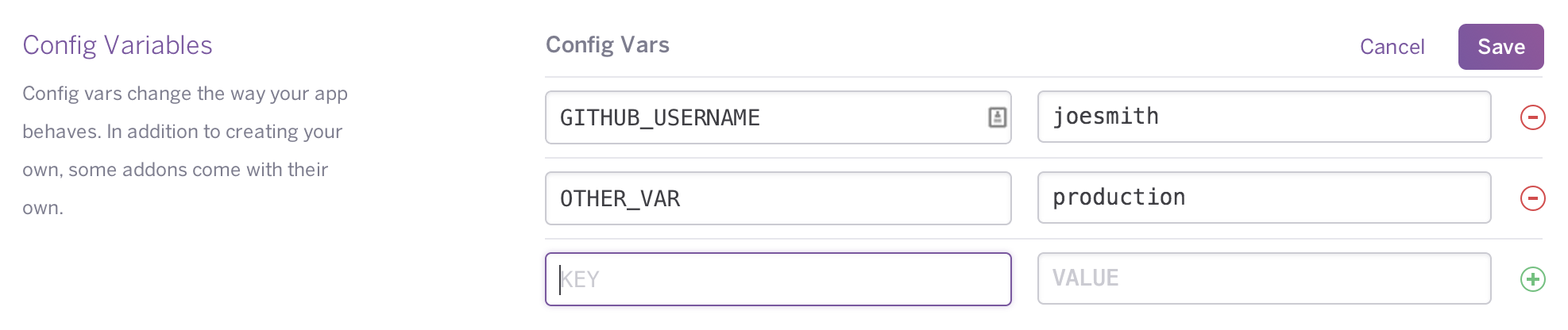
You can also edit config vars from your app’s Settings tab in the Heroku Dashboard:
Using the Platform API
You can manage your app’s config vars programmatically with the Heroku Platform API using a simple HTTPS REST client and JSON data structures. You need a valid Heroku access token representing a user with proper permissions on the app.
Accessing config var values from code
Config vars are exposed to your app’s code as environment variables. For example, in Node.js you can access your app’s DATABASE_URL config var with process.env.DATABASE_URL.
In the Common Runtime, we expand the values of the config vars referenced in your code commands before sending the output to your logs for audit purposes. Avoid using direct references to sensitive environment variables where your app code writes to standard out (stdout) or standard error (stderr).
Examples
Add some config vars for your S3 account keys:
$ cd myapp
$ heroku config:set S3_KEY=8N029N81 S3_SECRET=9s83109d3+583493190
Setting config vars and restarting myapp... done, v14
S3_KEY:   8N029N81
S3_SECRET: 9s83109d3+583493190
Set up your code to read the vars at runtime. For example, in Ruby you access the environment variables using the ENV['KEY'] pattern - so now you can write an initializer like so:
AWS::S3::Base.establish_connection!(
 :access_key_id   => ENV['S3_KEY'],
 :secret_access_key => ENV['S3_SECRET']
)
In Node.js, use process.env to access environment variables:
const aws = require('aws-sdk');

let s3 = new aws.S3({
  accessKeyId: process.env.S3_KEY,
  secretAccessKey: process.env.S3_SECRET
});
In Java, you can access it through calls to System.getenv('key'), like so:
S3Handler = new S3Handler(System.getenv("S3_KEY"), System.getenv("S3_SECRET"))
In Python, using the boto library:
from boto.s3.connection import S3Connection
s3 = S3Connection(os.environ['S3_KEY'], os.environ['S3_SECRET'])
Now, upon deploying to Heroku, the app will use the keys set in the config.
Config var scope
For apps using classic buildpacks, config vars are available at build time and runtime.
For apps using Cloud Native Buildpacks, by default, config vars are only accessible at runtime. You can make them available during both build time and runtime by enabling the Heroku Labs Build Time Config Vars feature.
Config var policies
- Config var keys should use only alphanumeric characters and the underscore character (
_), and not begin with a digit, to ensure that they are accessible from all programming languages and shells. Config var keys should not include the hyphen character. - Config var data (the combination of all keys and values) cannot exceed 64kb for each app.
- Config var keys should not begin with a double underscore (
__). - A config var’s key should not begin with
HEROKU_unless it is set by the Heroku platform itself.
Add-ons and config vars
If you provision an add-on for your app, it usually adds one or more config vars to the app. The values of these config vars might be updated by the add-on provider at any time.
See Add-on values can change to learn more about add-ons and how they use config vars.
Local setup
Use the Heroku Local command-line tool to run your app locally.
Production and development modes
Many languages and frameworks support a development mode. This typically enables more debugging, as well as dynamic reloading or recompilation of changed source files.
For example, in a Ruby environment, you could set a RACK_ENV config var to development to enable such a mode.
It’s important to understand and keep track of these config vars on a production Heroku app. While a development mode is typically great for development, it’s not so great for production, because it can degrade performance.