Scaling Your Dyno Formation
Last updated January 23, 2024
Table of Contents
Heroku apps can be scaled to run on multiple dynos simultaneously (except on Eco or Basic dynos). You can scale your app’s dyno formation up and down manually from the Heroku Dashboard or CLI.
You can also configure Heroku Autoscaling for Performance-tier dynos, and for dynos running in Private Spaces. Threshold autoscaling adds or removes web dynos from your app automatically based on current request latency.
Dynos are prorated to the second, so if you want to experiment with different scale configurations, you can do so and only be billed for actual seconds used. Remember, it’s your responsibility to set the correct number of dynos and workers for your app.
Manual Scaling
Scaling the Number of Dynos
Heroku dynos are classified into tiers: Eco, Basic, and Professional. Only Professional-tier dynos (Standard and Performance dynos) can be scaled to run multiple dynos per process type. Before you can scale the number of dynos, make sure your app is running on Professional-tier dynos:
- From the Heroku Dashboard, select the app you want to scale from your apps list.
- Navigate to the
Resourcestab. - Above your list of dynos, click
Change Dyno Type. - Select the
Professional (Standard/Performance)dyno type. - Click
Save.
Scaling from the Dashboard
To scale the number of dynos for a particular process type:
- Select the app you want to scale from your apps list.
- Navigate to the
Resourcestab. - In the app’s list of dynos, click the
Editbutton (looks like a pencil) next to the process type you want to scale. - Drag the slider to the number of dynos you want to scale to.
- Click
Confirm.
Scaling from the CLI
You scale your dyno formation from the Heroku CLI with the ps:scale command:
$ heroku ps:scale web=2
Scaling dynos... done, now running web at 2:Standard-1X
The command above scales an app’s web process type to 2 dynos.
You can scale multiple process types with a single command, like so:
$ heroku ps:scale web=2 worker=1
Scaling dynos... done, now running web at 2:Standard-1X, worker at 1:Standard-1X
You can specify a dyno quantity as an absolute number (like the examples above), or as an amount to add or subtract from the current number of dynos, like so:
$ heroku ps:scale web+2
Scaling dynos... done, now running web at 4:Standard-1X.
If you want to stop running a particular process type entirely, simply scale it to 0:
$ heroku ps:scale worker=0
Scaling dynos... done, now running web at 0:Standard-1X.
Changing the Dyno Type
Changing the Dyno Type from the Dashboard
To change between Eco, Basic, and Professional-tier dyno types:
- From the Heroku Dashboard, select the app you want to scale from your apps list.
- Navigate to the
Resourcestab. - Above your list of dynos, click
Change Dyno Type. - Select the desired tier.
- Click
Save.
To change the dyno type among Professional-tier dynos used for a particular process type:
- From the Heroku Dashboard, select the app you want to scale from your apps list.
- Navigate to the
Resourcestab. - Click the hexagon icon next to the process type you want to modify.
- Choose a new dyno type from the drop-down menu (Standard or Performance dynos).
- Click
Confirm.
Changing the Dyno Type from the CLI
To move a process type from standard-1x dynos up to standard-2x dynos for increased memory and CPU share:
$ heroku ps:scale web=2:standard-2x
Scaling dynos... done, now running web at 2:Standard-2X.
Note that when changing dyno types, you must still specify a dyno quantity (such as 2 in the example above).
Moving back down to standard-1x dynos works the same way:
$ heroku ps:scale web=2:standard-1x
Scaling dynos... done, now running web at 2:Standard-1X
See the documentation on dyno types for more information on dyno types and their characteristics.
Autoscaling
Autoscaling is currently available only for Performance-tier dynos and dynos running in Private Spaces. Heroku’s auto-scaling uses response time which relies on your application to have very small variance in response time. If Autoscaling doesn’t meet your needs or isn’t working as expected for your apps, you may want to consider a third-party add-on from the Elements marketplace. For example, you might consider an add-on that scales based on queuing time instead of overall response time.
Autoscaling lets you scale your web dyno quantity up and down automatically based on one or more application performance characteristics.
Configuration
A small number of customers have observed a race condition when using Heroku web autoscaling in conjunction with a third-party worker autoscaling utility like HireFire. This race condition results in the unexpected disabling of Heroku’s autoscaling. To prevent this scenario, do not use these two autoscaling tools in conjunction.
Autoscaling is configured from your app’s Resources tab on the Heroku Dashboard:

Click the Enable Autoscaling button next to your web dyno details. The Autoscaling configuration options appear:
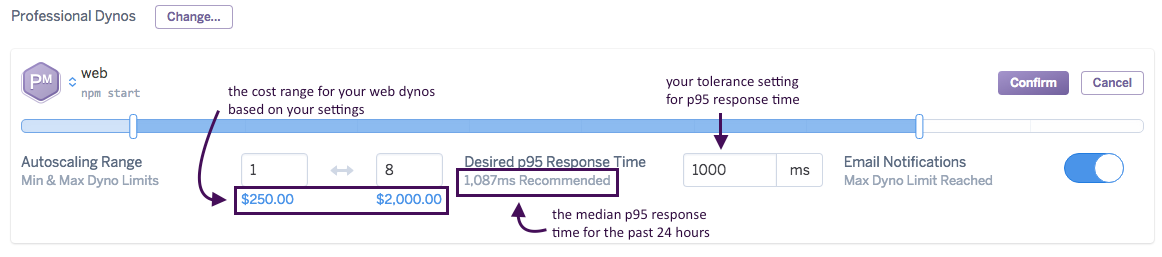
Use the slider or text boxes to specify your app’s allowed autoscaling range. The cost range associated with the specified range is shown directly below the slider. Your dyno count is never scaled to a quantity outside the range you specify. Note that the minimum dyno limit cannot be less than 1.
Next, set your app’s Desired p95 Response Time. The autoscaling engine uses this value to determine how to scale your dyno count (see below). A recommended p95 response time is provided.
Enable Email Notifications if you’d like all app collaborators (or team members if you’re using Heroku Teams) to be notified when your web dyno count reaches the range’s upper limit. At most one notification email is sent per day.
When you’ve configured autoscaling to your liking, click Confirm. Note that if your new autoscaling dyno range setting does not include the process type’s current dyno count, the current dyno count is immediately adjusted to conform to the range.
Autoscaling logic
The dyno manager uses your app’s Desired p95 Response Time to determine when to scale your app. The autoscaling algorithm uses data from the past hour to calculate the minimum number of web dynos required to achieve the desired response time for 95% of incoming requests at your current request throughput.
The autoscaling algorithm does not include WebSocket traffic in its calculations.
Every time an autoscaling event occurs, a single web dyno is either added or removed from your app. Autoscaling events always occur at least 1 minute apart.
The autoscaling algorithm scales down less aggressively than it scales up. This protects against a situation where substantial downscaling from a temporary lull in requests results in high latency if demand subsequently spikes upward.
If your app experiences no request throughput for 3 minutes, its web dynos scale down at 1-minute intervals until throughput resumes.
Sometimes, slow requests are caused by downstream bottlenecks, not web resources. In these cases, scaling up the number of web dynos can have a minimal (or even negative) impact on latency. To address these scenarios, autoscaling will cease if the percentage of failed requests is 20% or more. You can monitor the failed request metric using Threshold Alerting.
Monitoring autoscaling events
From the Heroku Dashboard
Autoscaling events appear alongside manual scale events in the Events chart. In event details they are currently identified as having been initiated by “Dyno Autoscaling”. In addition, enabling, disabling and changes to autoscaling are shown. If a series of autoscaling events occur in a time interval rollup, only the step where the scaling changed direction is shown. For example, in the Events chart below “Scaled up to 2 of Performance-M” is an intermediate step to the peak of 3 Performance-M dynos, and is not shown.

With webhooks
You can subscribe to webhook notifications that are sent whenever your app’s dyno formation changes. Webhook notifications related to dyno formation have the api:formation type.
Read App Webhooks for more information on subscribing to webhook notifications.
Disabling autoscaling
Disable autoscaling by clicking the Disable Autoscaling button on your app’s Resources tab. Then, specify a fixed web dyno count and click Confirm.
Manually scaling through the CLI, or otherwise making a call to ps:scale via the API to instruct it to manually scale (e.g. via a third-party autoscaling tool) will disable autoscaling.
Known issues & limitations
As with any autoscaling utility, there are certain application health scenarios for which autoscaling might not help. You might also need to tune your Postgres connection pool, worker count, or add-on plan(s) to accommodate changes in web dyno formation. The mechanism to throttle autoscaling based on a request throughput error rate of 20% or more was designed for the scenario where the bottleneck occurs in downstream components. Please see Understanding concurrency for additional details.
We strongly recommend that you simulate the production experience with load testing, and use Threshold Alerting in conjunction with autoscaling to monitor your app’s end-user experience. Please refer to our Load Testing Guidelines for Heroku Support notification requirements.
Scaling limits
Different dyno types have different limits to which they can be scaled. See Dyno Types to learn about the scaling limits.
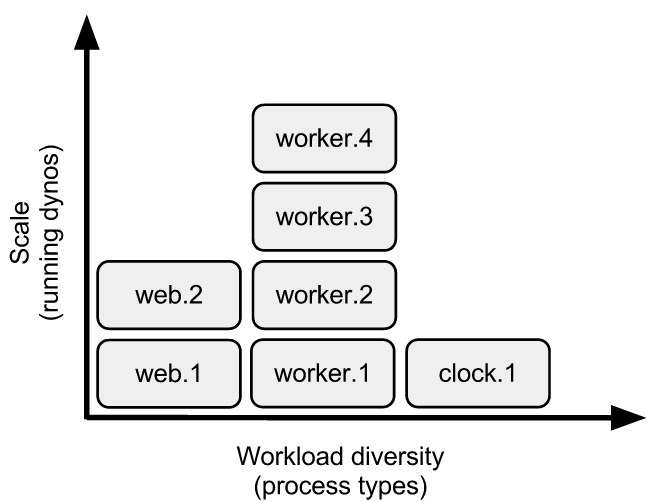
Dyno formation
The term dyno formation refers to the layout of your app’s dynos at a given time. The default formation for simple apps will be a single web dyno, whereas more demanding applications may consist of web, worker, clock, etc… process types. In the examples above, the formation was first changed to two web dynos, then two web dynos and a worker.
The scale command affects only process types named in the command. For example, if the app already has a dyno formation of two web dynos, and you run heroku ps:scale worker=2, you will now have a total of four dynos (two web, two worker).
Listing dynos
The current dyno formation can been seen by using the heroku ps command:
$ heroku ps
=== web (Eco): `bundle exec unicorn -p $PORT -c ./config/unicorn.rb`
web.1: up for 8h
web.2: up for 3m

=== worker (Eco): `bundle exec stalk worker.rb`
worker.1: up for 1m
The Unix watch utility can be very handy in combination with the ps command. Run watch heroku ps in one terminal while you add or remove dynos, deploy, or restart your app.
Introspection
Any changes to the dyno formation are logged:
$ heroku logs | grep Scale
2011-05-30T22:19:43+00:00 heroku[api]: Scale to web=2, worker=1 by adam@example.com
Note that the logged message includes the full dyno formation, not just dynos mentioned in the scale command.
Understanding concurrency
Singleton process types, such as a clock/scheduler process type or a process type to consume the Twitter streaming API, should never be scaled beyond a single dyno. These process types don’t benefit from additional concurrency and in fact they will create duplicate records or events in your system as each tries to do the same work at the same time.
Scaling up a process type provides additional concurrency for performing the work handled by that process type. For example, adding more web dynos allows you to handle more concurrent HTTP requests, and therefore higher volumes of traffic. Adding more worker dynos lets you process more jobs in parallel, and therefore a higher total volume of jobs.
Importantly, however, there are scenarios where adding dynos to a process type won’t immediately improve app performance:
Backing service bottlenecks
Sometimes, your app’s performance is limited by a bottleneck created by a backing service, most commonly the database. If your database is currently a performance bottleneck, adding more dynos might only make the problem worse. Instead, try some or all of the following:
- Optimize your database queries
- Upgrade to a larger database
- Implement caching to reduce database load
- Switch to a sharded configuration, or scale reads using followers
Long-running jobs
Dyno concurrency doesn’t help with large, monolothic HTTP requests, such as a report with a database query that takes 30 seconds, or a job to email out your newsletter to 20,000 subscribers. Concurrency gives you horizontal scale, which means it applies best to work that is easily subdivided.
The solution to the slow report might be to move the report’s calculation into the background and cache the results in memcache for later display.
For the long job, the answer is to subdivide the work: create a single job that in turn puts 20,000 jobs (one for each newsletter to send) onto the queue. A single worker can consume all these jobs in sequence, or you can scale up to multiple workers to consume these jobs more quickly. The more workers you add, the more quickly the entire batch will finish.
The Request Timeout article has more information on the effects of concurrency on request queueing efficiency.